HINCHLEY WOOD SCHOOL

I am currently on deployment to Hinchley Wood School.
Below you can click on the links to see key information about the school.
Certain resources on this page may not be visible to you. View the Security Policy of this Teaching File site to learn more about the measures I take to protect sensitive data.
ENTRY000-29/10/25
Teaching Religious Studies
Both religious studies and computer science are the study of importance and importing. Just as computer programs have advantages and disadvantages, and discipline is required to be able to uncover these (since programs are written in code), belief systems also have advantages and disadvantages, which require nuance and discipline to be able to uncover (since their meaning is complex, and can be grounded in texts written in Hebrew or Greek or Latin). They are both the study of the concepts and principles that guide agents that move about the world. Microsoft, Google, Apple and Amazon have immense amounts of influence on the way society is. I believe that the influence of these large, structured corporate entities arguably competes with those of the major religions.
Here are some useful resources I am placing here for my teaching Religious Studies..
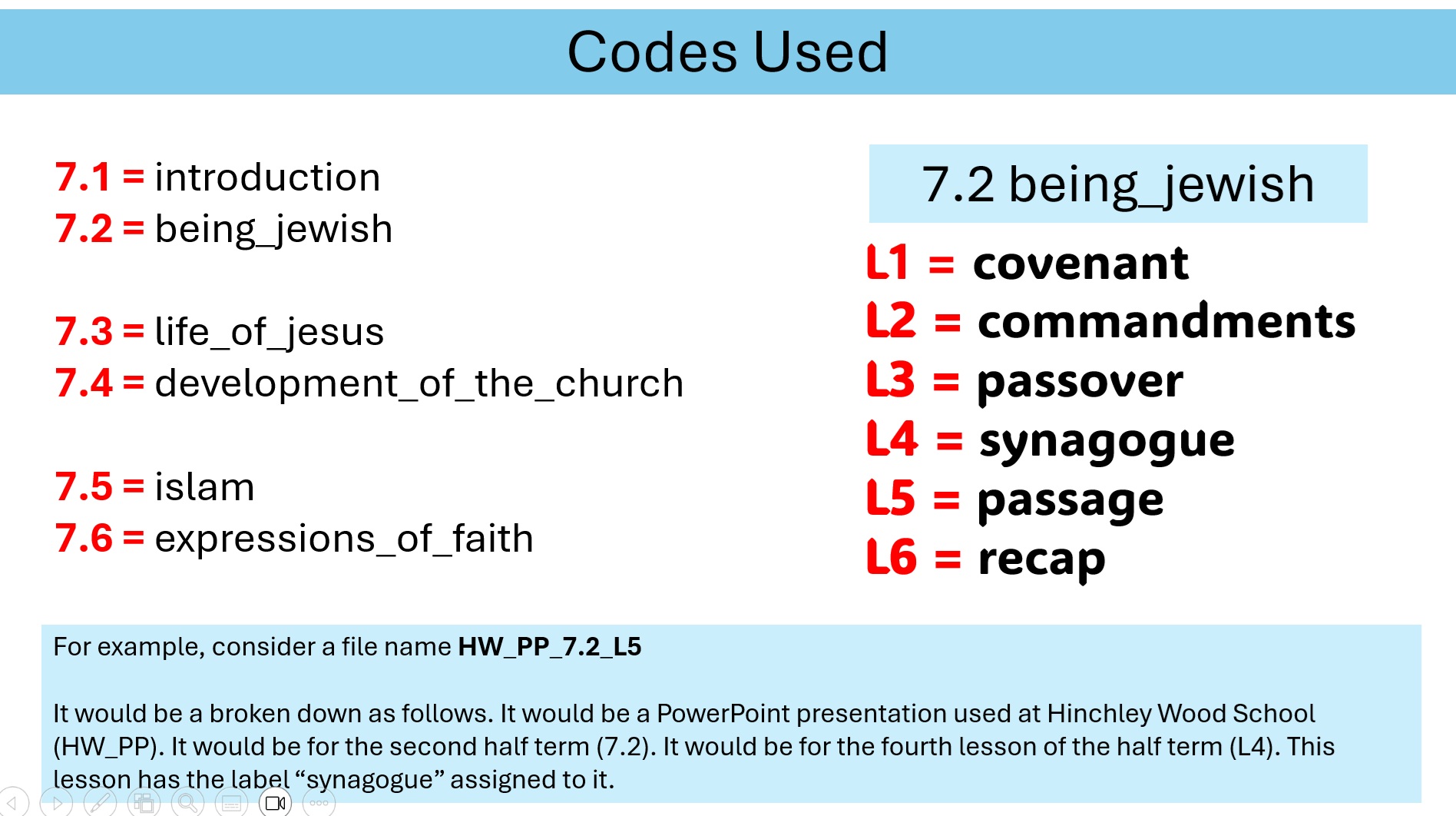
Here, below, are the PowerPoints (the HW PRE department use Microsoft PowerPoint and not Google Slides) used by RAS. I prefer PowerPoint. I was raised on it, being relied on by teachers to achieve things on PowerPoint in primary school, and I feel the deficiencies of functionality in Google Slides every time I have to use it. These resourcesI use as my starting point. They are not publicly visible.
PowerPoint for L1 (covenant) PowerPoint for L2 (commandments) PowerPoint for L3 (passover) PowerPoint for L4 (synagogue) PowerPoint for L5 (passage)Somebody is known as LMD. They have versions of the PowerPoints:
PowerPoint for L1 (covenant) PowerPoint for L2 (commandments) PowerPoint for L3 (passover) PowerPoint for L4 (synagogue)YouTube videos used for 7.2 (being_jewish)
The film The Prince of Egypt is shown during L2 - moses.
This 1998 American animated film featured Ralph Fiennes as the voice of Rameses. Rameses was Moses's adoptive brother.
A guidance sheet is used for watching the film.

Resources for L6 - Recap
Certain resources on this page may not be visible to you. View the Security Policy of this Teaching File site to learn more about the measures I take to protect sensitive data.
ENTRY000-29/10/25
It is 18th January 2026 and I am just finalising my preparations to take over teacing of a Year 10 class.
This is the first time I will be teaching Y10.
I have set up a special page for my preparations, which you can visit by clicking here.
.
Below you can click on the links to see key information about the school.
Certain resources on this page may not be visible to you. View the Security Policy of this Teaching File site to learn more about the measures I take to protect sensitive data.
ENTRY000-29/10/25
School Policies
Various school policies can be viewed below.
ENTRY000-dd/mm/yy
Special Education Needs (SEN) Information
Certain resources on this page may not be visible to you. View the Security Policy of this Teaching File site to learn more about the measures I take to protect sensitive data.
If a link returns 403, first visit Activate Access.
Seating Plans
Certain resources on this page may not be visible to you. View the Security Policy of this Teaching File site to learn more about the measures I take to protect sensitive data.
If a link returns 403, first visit Activate Access.
Class Lists
Certain resources on this page may not be visible to you. View the Security Policy of this Teaching File site to learn more about the measures I take to protect sensitive data.
If a link returns 403, first visit Activate Access.
Creating a Lanyard Timetable
How do you create a miniature lanyard to go around your neck? It is a small card that fits inside your access card holder.
What is the most effective way of doing this? There has to be a better way than simply trial-and-error. The way I did it first was by screenshotting the timetable on Google Sheets, pasting the image into Word, and then printing it off. You then manually test it. If it fits into the ID card holder, then well done. If it is too large, make the image on Word slightly smaller.
The process of printing, testing, and readusting repeats. When you need to print a new version, you repeat the process. Surely there is a better way.
Click here for a the word document created.
Click here for a the PDF document created.
New Lanyard Word Document
If a link returns 403, first visit Activate Access.
Viewing Grades at HWS
MCO showed me how to click the "filter" icon.
Go to the folder entitled "Computer Science Dept [KS3]". Make sure you are on the KS3 folder.
Go to the tab entitled simply "7" (in the bar at the bottom).
Look at the columns carefullly: you should see one entitled Teaching Group.
9B
Click this hyperlink to view my instructions for how to view and manipulate student homework grades.
Click here for a the word document created.
Click here for a the PDF document created.
If a link returns 403, first visit Activate Access.
ENTRY002-16/10/25
Would you like to see Lesson Plans? Please visit my Professional Notes.
Would you like to see Assessment Schema? Please visit my Professional Notes.